In-browser, no upload —
free image format converter
Instantly convert & download images as PNG · JPEG · WebP. 100% in-browser — files are never uploaded to a server. Quality slider, transparent-background fill, color-based background removal, EXIF rotation — no install, no signup.
Runs in your browser · Input PNG/JPG/WebP/GIF/BMP/SVG · Output PNG/JPEG/WebP · No install.
▶ Live Demo — drop · pick · download
An interactive recreation of the real flow: drop an image → pick a format → adjust quality → remove background → download, played automatically.
The actual app
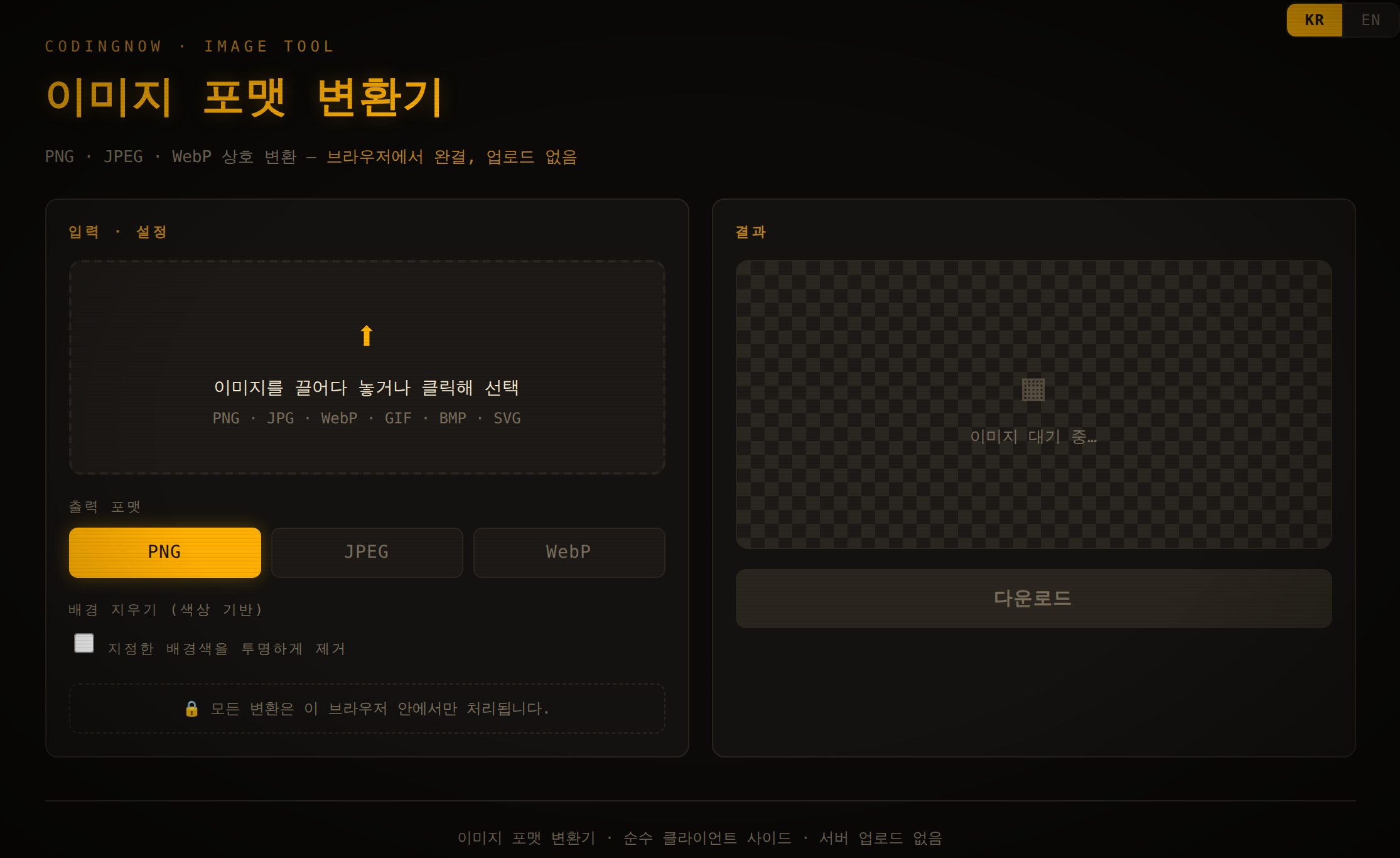
Add an image and choose a format/options on the left; the right side shows a live preview and file info (name, resolution, original / converted size, percent change), and enables the download button.
Why this exists — no upload worries
Built to remove the “where do I upload this?” friction of converting a single image. Typical online converters upload your file to a server; here everything from conversion to download happens in your browser — photos, documents, and sensitive images never leave your machine.
It's a single HTML file: no install, no signup, no payment, and it even works offline.
Who it's for
- Bloggers / site owners — convert photos to WebP to cut size and speed up pages
- Designers / developers — transparent PNG ↔ JPEG/WebP, logo background removal
- Privacy-conscious users — process locally with no upload
- Everyday users — match format/size limits for chat, docs, marketplaces
How to use
Step 1 — Add an image
Drag an image onto the dashed drop zone on the left, or click to pick a file. PNG/JPG/WebP plus GIF/BMP/SVG and most browser-readable images work. It auto-converts and previews on the right immediately.
Step 2 — Pick an output format
- PNG — lossless, transparency. Logos, icons, screenshots
- JPEG — lossy, small. Great for photos (no transparency)
- WebP — smaller at the same quality, recommended for web. Supports transparency
Step 3 — Quality slider (JPEG/WebP)
A 0–100 slider balances quality vs. size. For photos, 70–85 is a good range. The output size and percent change update live as you drag. (PNG is lossless, so no slider.)
Step 4 — Background fill / removal
When converting a transparent PNG to JPEG, the background fill color (white by default) prevents black blotches. To make a solid background transparent, toggle background removal → use the eyedropper to pick the color → adjust the tolerance slider. Save as PNG or WebP to keep transparency.
📖 Related: How to convert HEIC to JPG · How to convert WebP to JPG · JFIF to JPG (just rename it) · How to convert AVIF to JPG · Make an image background transparent · Reduce image file size
Step 5 — Download
Click Download. The file keeps its original name with a new extension (photo.png → photo.webp) and is truly re-encoded, so it's recognized everywhere.
💡 For images going on a website, try WebP first — it keeps quality while cutting size significantly.
Key features
| Feature | Notes |
|---|---|
| PNG · JPEG · WebP | Convert between all three (real re-encoding) |
| Quality slider | 0–100, live output size & percent change |
| Background fill | Prevents black blotches on PNG→JPEG (pick color) |
| Background removal | Color-based + eyedropper + tolerance slider |
| EXIF rotation | Auto-corrects capture orientation |
| 100% in-browser | No upload, works offline |
FAQ
Q. Are my images uploaded to a server?
No. Everything happens inside your browser; it even works offline and files are never sent to a server.
Q. Does it handle large images?
Yes — it's built to process high-resolution images smoothly.
Q. Can I convert multiple images at once?
This version converts one at a time — focused on doing one image flawlessly.
Q. Converting a transparent PNG to JPEG turns the background black.
JPEG has no transparency. The background fill color (white by default) that appears for JPEG fills transparent areas, so no black blotches. Save as PNG/WebP to keep transparency.
Q. Is it a fake conversion that only changes the extension?
No. It truly re-encodes via canvas — the content is genuinely the new format, recognized everywhere.
🖼️ Free · Open source · No ads
“Put an image in, get the format you want out.” Doing that one thing as fast and safely as possible is the goal. Try it now — no upload required.
Source & issues: github.com/cflab2017/Tool_web_image_converter
Found this useful? ❤️ Support the maker
Any amount helps. Sent directly with no ad or processing fees.
Comments 0
No comments yet. Be the first.
Only members can comment.
Comments with ads, abuse, personal information or illegal content are hidden or removed. Comments are shown with your nickname. Privacy Policy