- The programs in this guide are external programs that attach to the running game's memory. That kind of program is not allowed by Blizzard's terms, so your account may be suspended, and you use them at your own risk.
- This guide covers single player against the computer only. Do not use them against people on Battle.net, ladder or public games. Multiplayer setup is not covered here.
- Running Pluto in Remastered is unofficial (Pluto's supported environment is Brood War 1.16.1 + BWAPI).
- This site does not re-host Pluto or the bridge — it only links to the original sources.
How to Run Pluto AI in StarCraft: Remastered — Setup, a Settings Tool, and Common Errors
We ran Pluto (the CoG 2026 model), the StarCraft AI released by tscmoo, in StarCraft: Remastered single player against the computer. We first installed it from the command line, but installing alone wasn't enough to use it comfortably, so we built a separate Pluto settings tool (GUI) and tested it. Below is exactly what we did on this PC on November 14–16, 2026: install steps → using the settings tool → game results → errors we hit. Anything we didn't try is marked 'not verified'.
What Pluto is, and what we did
Pluto is a StarCraft: Brood War AI by tscmoo. A single neural network plays the whole game — macro and micro — the way it learned through self-play reinforcement learning. It officially runs on Brood War 1.16.1 + BWAPI 4.4.0. It is distributed as binaries only; there is no source code or redistribution license.
The Pluto Remastered bridge (by lpflhh) lets Pluto run in StarCraft: Remastered without modifying Pluto's files. It does not change game files either — it attaches to the running game's memory. Running Pluto in Remastered is therefore an unofficial setup, not Pluto's supported environment.
- What we did ① fixed a window problem in the bridge's launch script (described in words at the end of 'Install steps' — we do not publish the modified file)
- ② rebuilt the bridge with the PlutoArena (MIT) patch to add an APM cap and reaction delay — we do not publish the rebuilt dll / exe (the original repository has no license, so there is no permission to redistribute)
- ③ installing alone wasn't enough to use it comfortably, so we built a separate settings tool (GUI) and tested it — available to download (see the 'Settings tool' section; Korean / English)
Requirements
| Item | Requirement | This PC (where we tested) |
|---|---|---|
| Game | StarCraft: Remastered 1.23.10.13515, the x86 (32-bit) executable | 1.23.10.13515 (Korean), C:\Program Files (x86)\StarCraft\x86\StarCraft.exe |
| OS | Windows 10/11 64-bit | Windows 11 |
| CPU | AVX2 required, AVX-VNNI recommended (about 2× faster inference), 6+ cores recommended | i7-12700KF (12 cores, AVX-VNNI) |
| Memory | About 2 GB free | 32 GB |
- If the game version differs, the launcher stops at the hash check. When Remastered updates, the bridge needs a new release too.
- The 64-bit game executable (
x86_64) does not work. The bottom-right of the main menu should read1.23.10.13515 | … | 32-bit(screenshot below).
What to download — links to the original sources only
This site does not re-host Pluto or the bridge. Download them yourself from the original sources below (the addresses are written out in full).
| File | Original source | Size |
|---|---|---|
Pluto CoG 2026 model pluto-cog2026-2578600.zip | https://github.com/tscmoo/pluto/releases/tag/cog2026-2578600 | about 286 MB |
Pluto Remastered bridge (source + prebuilt bin/) | https://github.com/lpflhh/Pluto-AI-Starcraft-Remaster | a few MB |
- The model officially supported by the bridge is CoG 2026. The original bridge does not accept the newer v2.0 (2026-10).
- Check each zip's SHA-256 against the value on its release page. On this PC the zip, dll, inference engine and weights all matched.
Install steps (in the order we actually did them)
- 1Get the bridge —
git clone https://github.com/lpflhh/Pluto-AI-Starcraft-Remaster.git.bin/already containspluto-scr.dllandscr-loader.exe, so no build is needed. - 2Get the Pluto model — unzip the file above into any folder. You get
pluto.dll,pluto/pluto_infer.exeandpluto/pluto_weights.bin. - 3Verify the files — check hashes without starting StarCraft (first command below). You should see
Verified StarCraft, Pluto DLL, inference engine, weights and bridge files. - 4Close StarCraft completely. The launcher stops if it is already running.
- 5Run — second command below.
Pluto ready in StarCraft process ...means it worked. - 6In the game, go to Single Player → Expansion (Brood War) → confirm your ID → Custom Game, pick your race and the opponent slots in Melee, and confirm. Pluto then controls your units. (Menu names here come from the Korean client; the English labels were not checked.)
# 3. Verify files (does not start StarCraft)
powershell -ExecutionPolicy Bypass -File scripts\start-pluto.ps1 -Pluto <path to pluto.dll> -VerifyOnly

# 5. Run
powershell -ExecutionPolicy Bypass -File scripts\start-pluto.ps1 -Pluto <path to pluto.dll>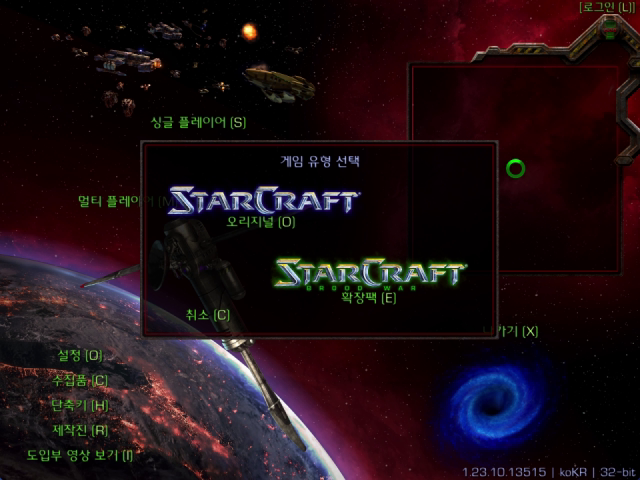
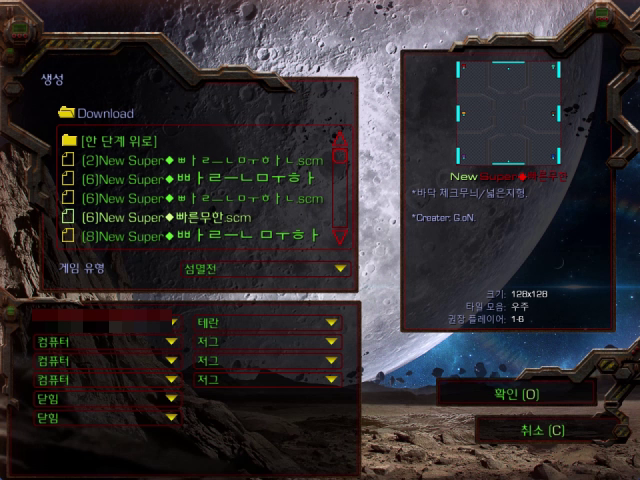
- 1v1 mode needs exactly one computer opponent. Set the remaining slots to 'Closed'.
- When the game starts you see 'Pluto online (md07x02_cog2026_2578600_int8mv). gl hf!'.
- While watching, only move the camera. Clicking units yourself mixes your commands with the bot's.
What went wrong with the original script — it starts StarCraft in a hidden window, and on this PC no window handle was created, so it failed twice with 'StarCraft did not create its window within 30 seconds'. We removed the hidden-window option (-WindowStyle Hidden) and raised the wait to 90 seconds (we do not publish the modified script). The settings tool below also makes a hidden StarCraft window visible.
Installing alone wasn't enough — so we built a settings tool (GUI)
Even after installing, using Pluto meant typing paths and options into PowerShell every time, and switching between 1v1 and 1-vs-many or changing game speed meant rewriting the command. So we built a separate settings tool where you just pick options and press ▶ Run, and tested it. It calls the launch script with the options you chose and shows, at the bottom, whether StarCraft is running, the last game's result, the exact command line it will run, and a run log. You can switch Korean / English from 'Language' at the top right (it follows the Windows language at first launch).
Download — Pluto Settings Tool 1.0.0 (installer) · address https://dl.coding-now.com/pluto-gui/PlutoSettingsSetup-1.0.0.exe · size 9,578,229 bytes (about 9.6 MB) · SHA-256 0c0f95eed212cb26772e8978bbaf62848e2a01de0a9b7a115c04ef9af6028d3a · license MIT (CODINGNOW) · Korean / English
- This file does not include Pluto or the Remastered bridge (launcher). Get them from the original sources under 'What to download' — the tool needs them to work. The installer contains only the settings tool, a README, the license and third-party notices.
- It is an unsigned program, so Windows (SmartScreen) may warn you when you download or first run it. Compare the downloaded file's SHA-256 with the value above before running it (PowerShell:
Get-FileHash PlutoSettingsSetup-1.0.0.exe). - On first launch it shows a notice (Terms of Service and account-suspension risk, single player only, never against people) and you must agree before using it.
- We confirmed a real game (1v1 vs computer) runs with lpflhh's original launcher — on this PC the original launcher alone failed after waiting 30 seconds for the StarCraft window, while with the tool making the hidden window visible it was ready in 6.5 seconds, and Pluto won at 7:15. With the original launcher, the APM cap and reaction delay fields are turned off.
- The APM cap and reaction delay work with a bridge that has the PlutoArena bridge patch (MIT) applied. A real game using PlutoArena's release launcher together with the tool has not been tested yet.
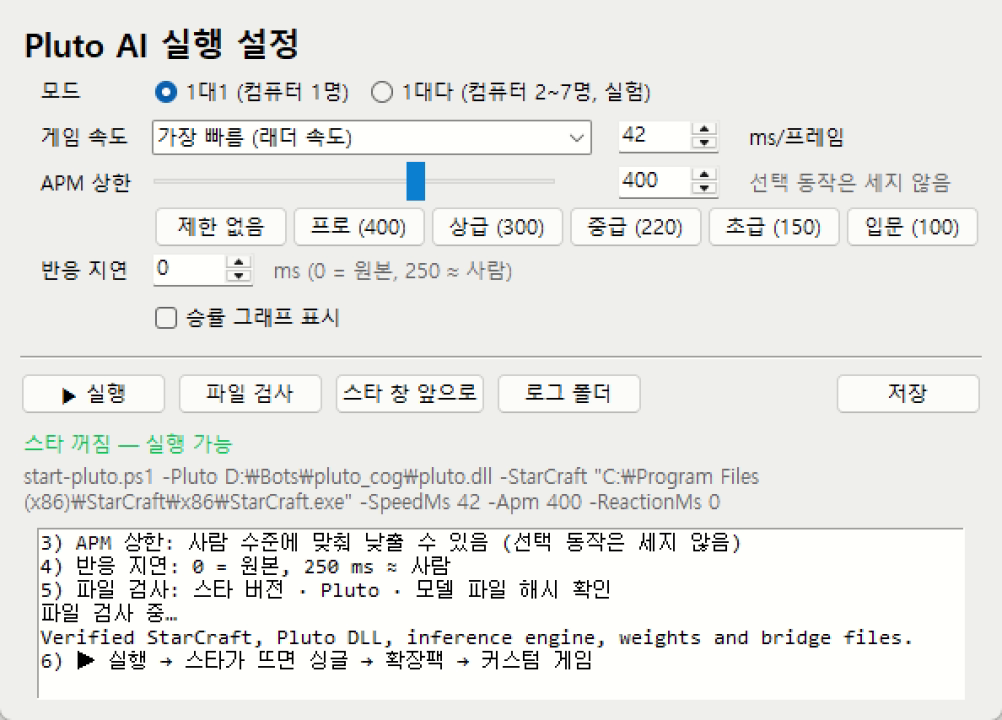
| Option | What it does | Suggested value |
|---|---|---|
| Mode | 1v1: one computer only. 1-vs-many (experimental): in Melee · Top vs Bottom, Pluto alone on one team against 2–7 computers | Start with 1v1 |
| Game speed | Time per frame (ms). 0 = unlimited, 42 = 'Fastest', 84 = half that, -1 = follow the game menu setting | 42 to watch, 84 to watch slowly |
| APM cap | Actions per minute limit (unit 'select' is not counted). Excess actions wait for the next frame; actions delayed more than 1 second are dropped. 0 = unlimited — only works with a bridge that has the PlutoArena bridge patch (off with the original launcher) | Original strength 0, strong human 300–400, intermediate 220, beginner 150 |
| Reaction delay | Extra delay before a command reaches the game (ms, 42 ms = 1 frame) — only works with a bridge that has the PlutoArena bridge patch (off with the original launcher) | Original 0, human-like 250 |
| Win-rate graph | Draws the model's estimated win rate over the game screen | Never turned on and checked (not verified) |
- Buttons: [Verify files] hash check only · [Bring StarCraft to front] · [Log folder] · [Save] — settings are kept in
pluto_gui.json. - Changes take effect only after you close StarCraft and run it again. The same goes for the mode (1v1 / 1-vs-many).
- With the original launcher (lpflhh), the tool sees that
start-pluto.ps1has no APM / reaction-delay options, turns those two fields off, and passes only mode, speed and graph. The original launcher starts StarCraft in a hidden window, but the tool makes that window visible (see the test result above).
Games we played — all single player against the computer
| Setup | Result |
|---|---|
| 1v1, Pluto Terran vs Zerg computer, unlimited speed · map (6)New Super◆빠른무한 | Win 5:46 |
| 1-vs-many, Pluto (random → Protoss) vs 7 computers · map (8)New Super◆빠른 무한 | Win in about 26 minutes — score about 4× the runner-up |
We played four 1v1 games at 2× speed (vs Zerg computer) with different APM caps and won them all. 'Busiest minute' below is the number of commands in the bridge log per minute of game time (unit selection excluded) — the lower the cap, the closer it stopped near that cap. These were measured with our rebuilt launcher; the original launcher cannot set a cap.
| APM cap | Result · game time | Busiest minute (selection excluded) |
|---|---|---|
| None | Win · 9:49 | 999 |
| 400 | Win · 7:28 | 407 |
| 220 | Win · 8:58 | 218 |
| 150 | Win · 8:24 | 158 |
- In 1-vs-7, once there were many units, Pluto showed a 'this PC can't keep up' notice once — inference took about 86 ms per step and held the game for about 44 ms each time. With many units the CPU slows the game down.
- Pluto was trained for 1v1, so in 1-vs-many it decides its opening and the opponent's race based on the first opponent only.
Common errors
| Message · symptom | Cause | Fix |
|---|---|---|
Exit the existing StarCraft process before starting Pluto. | StarCraft is already running | Close StarCraft completely and run again |
StarCraft did not create its window within ... seconds. | The original script's hidden window | See 'What went wrong with the original script' above |
| StarCraft started but nothing is on screen | The window started hidden | Settings tool [Bring StarCraft to front] |
The game started but Pluto does nothing (log session_skipped requires_two_players) | Started in 1v1 mode with several computers | Close StarCraft and run again in 1-vs-many mode |
| Stops on a hash mismatch | Game or model version differs (v2.0 model, game update) | Use the CoG 2026 model and game 1.23.10.13515 |
| 'This PC can't keep up' notice, slow game | CPU inference delay (many units, 1-vs-many) | Fewer opponents, larger speed value |
| Entered 'Original' from the menu | Picked Original in the game type dialog | Pick 'Expansion' |
Logs are in the bridge folder: runtime\ for 1v1 (bridge.log, pluto.log, pluto_infer.log) and runtime-challenge\ for 1-vs-many.
Not verified yet
- A real game using PlutoArena's release launcher together with the settings tool
- The win-rate graph screen
- The APM cap actually cutting in during a big fight · a game with a reaction delay set
- Running the Pluto v2.0 model with this bridge · Top vs Bottom in 1-vs-many
- Playing yourself against Pluto is outside the scope of this guide (single player only), so it is not covered
Files and licenses — what we publish and what we don't
| Item | License | This site |
|---|---|---|
| Pluto (tscmoo) dll · inference engine · weights | No license file (binary-only release) | Links only |
| Pluto Remastered bridge (lpflhh) | No repository license (bundled BWAPI is LGPL v3, MinHook is BSD) | Links only |
| PlutoArena bridge patch | MIT | The patched result is lpflhh's code, so we don't publish it |
| Our rebuilt dll · exe and modified launch script | Modified lpflhh code | Not published (changes described in words only) |
| Our settings tool (Pluto Settings Tool) | MIT (CODINGNOW) | Published — address in the 'Settings tool' section (does not include Pluto or the launcher) |
Source: our own test log from November 14–16, 2026 (StarCraft AI series). A video on the Coding Now channel will be added here once it is public. This is the English version of the Korean guide.