Zero-install portable
serial terminal
Download → double-click → done. A single 8.25 MB .exe handles serial monitoring, HEX send / receive, and ASCII ↔ HEX conversion. No installer, no runtime, no admin rights. Built for Arduino, ESP32, modems, industrial sensors.
Windows 10 / 11 (64-bit) · No runtime prerequisites · Single .exe · Unzip and double-click. All releases
▶ Live Demo — serial monitor & HEX I/O
An interactive in-browser recreation of the real app flow: connect a port → send / receive text → switch to HEX → save log — all in one screen. Get a feel for it before you download.
The actual app
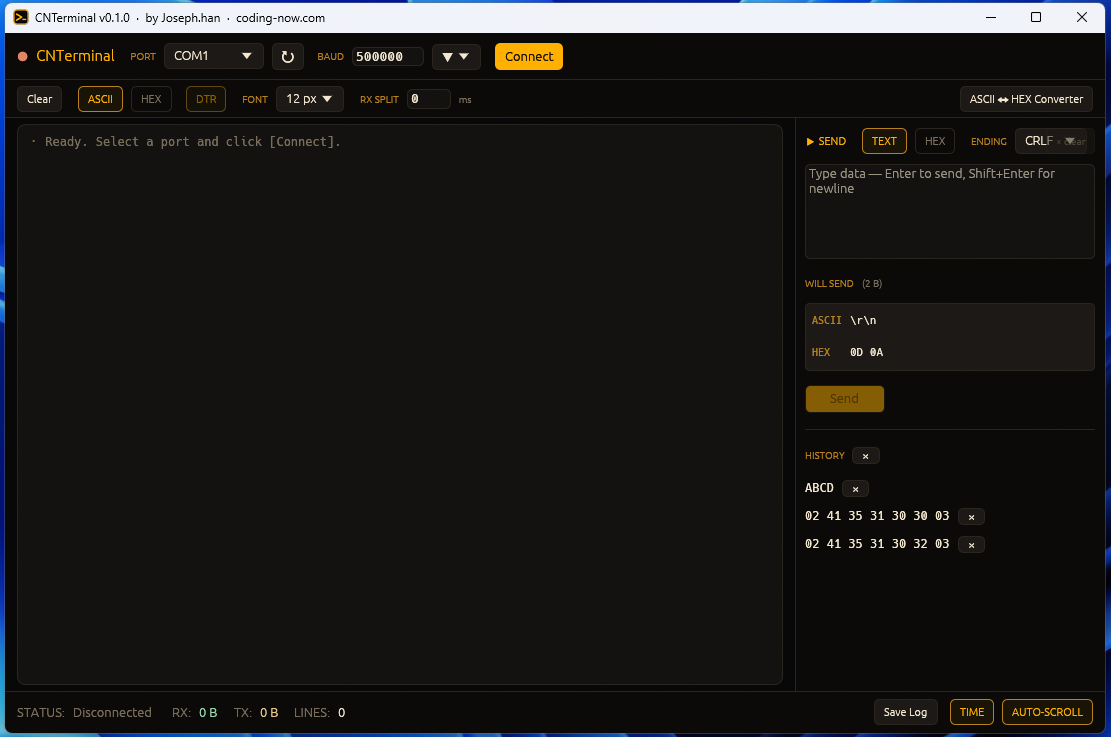
PORT and BAUD on top, console on the left, send panel on the right, HEX and DTR toggles in the second row. First send / receive happens within a minute of first launch.
Why this exists — the gaps in PuTTY & Arduino IDE
Existing tools each have their limits. PuTTY makes you reopen its config dialog every session and is awkward with HEX; the Arduino IDE serial monitoris unusable during a compile and doesn't do HEX; professional serial analyzers tend to be paid.
CNTerminal is a single .exe built with Rust + egui. Unzip and run, drop it on a USB stick and double-click on any PC. Every setting and log lives alongside the .exe, so moving machines doesn't lose state.
📖 Related: HyperTerminal for Windows 10 and 11 — PuTTY, Tera Term, RealTerm compared, COM port setup
Who it's for
- Embedded developers — Arduino, ESP32, STM32, microcontroller debugging. HEX protocols and checksum verification
- Makers & students — first serial-comm lesson through final exhibits. Run from a USB stick when school PCs deny installs
- Automation / test engineers — RS-232 / 485 industrial gear, PLCs, instrumentation. Save Log for regression runs
- Field engineers— plug a USB stick into the customer's machine, double-click, debug. No install approval needed
- Team sharing — drop the .exe on a shared network folder; the whole team uses the same environment
Download & first launch
Grab CNTerminal_v0.1.0.exe from the button above or GitHub Releases. About 8.25 MB. Drop it in any folder and double-click.
- Windows 10 / 11 (64-bit)
- No admin rights — runs from user folders or USB sticks
- No .NET / VC++ runtimes / WebView2 — Rust static build, all self-contained
- USB-serial chipset drivers (CH340 / CP210x / FTDI) are usually auto-installed by Windows. If your port doesn't show up, install the vendor driver first
Windows SmartScreen may say “Windows protected your PC”. Expected for an unsigned free .exe — click More info → Run anyway to continue.
SHA-256 integrity: 32cb1469db828f115d64ffe3c0d88042df31787804e7368cfdd4e364a49e9f5c
PowerShell: Get-FileHash CNTerminal_v0.1.0.exe
5-minute walkthrough — first I/O
Step 1 — Pick a port and baud rate
From the top PORT drop-down, pick your device port (↻ to refresh). BAUD takes presets (9600–921600) or any custom value typed in (e.g. 500000). Hit Connect; the LED turns green and RX prints in real time.
Step 2 — Send + WILL SEND preview
Type a command in the SEND multiline box and hit Enter (line break is Shift+Enter). Pick line terminator (None / LF / CR / CRLF) in the ENDING combo. The WILL SEND preview underneath shows exactly what bytes will hit the wire — catch typos before they go out:
WILL SEND   (5 B)
ASCII  A00\r\n
HEX    41 30 30 0D 0A
Step 3 — HEX mode & RX SPLIT
Toggle HEX in the second row → console switches to hex dump view. RX SPLIT in ms (e.g. 2) auto-breaks a new line whenever no byte arrives for that long — essential for binary frames without a natural delimiter (STX/ETX).
Step 4 — Save Log & send history
Save Log writes the current console to a timestamped .txt. The ↑↓ History on the send box cycles through the last 50 commands for fast repeats.
💡 ESP32 auto-reset avoidance: toggle DTRto off (gray) in the second row. The DTR line then stays put across connect / disconnect and the board doesn't reset.
Use cases
Arduino serial monitoring
Lines like Serial.println("temp=25.3") land in the console with a per-line timestamp. Auto-scroll keeps you at the bottom; Save Log preserves a session. Unlike the Arduino IDE serial monitor, it stays open while you re-flash.
HEX protocols (STX/ETX, checksums)
Industrial sensors and PLCs that wrap payloads in 0x02 ... 0x03 STX/ETX binary frames? HEX mode plus RX SPLIT 2 ms is the recipe. Sending raw bytes is just 02 41 35 30 30 03 into the HEX send box.
ESP32 / Wi-Fi module debugging
When debugging AT commands or boot logs, flip DTR off so connect / disconnect doesn't reset the board mid-stream. Uninterrupted log capture from power-on.
📖 Related: Why your ESP32 resets when the monitor opens · Fixing ESP32 upload errors (Failed to connect)
Customer-site / on-call debugging
Don't want to drag a laptop into a customer's factory? A USB stick is enough — plug into their PC, double-click, debug. No admin approval, no install hand-off form.
Under the hood — Rust + egui, statically linked .exe
CNTerminal is a native desktop app built on Rust + egui. Serial I/O goes through the serialport crate, and an mpsc channel decouples the UI thread from a dedicated reader thread so bursty RX doesn't stutter the UI.
[UI thread (egui)]
  └─ send: tx → channel
        ▼
[send channel (mpsc)]
  └─ writer thread: serialport.write()
        ▼
[serial port]
        ▲
[reader thread (50 ms timeout)]
  └─ serialport.read() → channel
        ▼
[UI thread (egui)]
  └─ console refresh (20 ms batch)
Full source on GitHub — build, fork, redistribute freely.
Key features
| Feature | Notes |
|---|---|
| ASCII ↔ HEX converter | Built-in popup, instant two-way conversion, escape sequences (\n, \r, \t, \xNN) |
| WILL SEND preview | ASCII + HEX shown side-by-side before the bytes hit the wire |
| DTR toggle | Stop ESP32 / Arduino from auto-resetting; capture uninterrupted boot logs |
| Send history (50) | Cycle prior commands with ↑↓ |
| 5,000-line auto-trim | Memory-bounded for long monitoring sessions |
| Auto-saved config | cnterminal.cfg — plain key=value, travels with the .exe |
| Save Log | HH:MM:SS.mmm timestamp prefix .txt — feed into regression diff or QA reports |
FAQ
Q. Why no installer?
It's a single .exe — unzip and run. Settings and logs live next to the .exe as plain text, so you can put the whole thing on a USB stick and use it on any machine without admin rights or install approvals.
Q. SmartScreen or antivirus blocks it.
Expected for an unsigned free .exe. Click More info → Run anyway. Or build from source — it's a stock Rust cargo build, one command.
Q. My ESP32 resets every time I connect.
ESP32 and Arduino reset on DTR line changes. To avoid unintentional resets while debugging, toggle DTR off (gray)in the second toolbar row. The DTR line then stays put across connect / disconnect and the board doesn't reset.
Q. Korean / non-ASCII text shows as garbage.
If your device sends EUC-KR or another legacy encoding, the console will show garbage. Either change the firmware to UTF-8 output, or switch the console to HEX mode and inspect the bytes directly.
Q. What format are the saved logs?
Save Log writes the current console to a .txt file with HH:MM:SS.mmm timestamp prefixes — easy to grep and to feed into regression / QA reports.
Q. What about the license?
Full source on GitHub — build, modify, redistribute freely. No fee for personal or commercial use. See the LICENSE file in the repo for exact terms.
📟 Free · Open source · No ads
Made so that “debug a serial device” doesn't require an install dialog every time. One USB stick, every machine, from Arduino to industrial PLC.
Source & issues: github.com/cflab2017/tool_serial_terminal_Rust
Found this useful? ❤️ Support the maker
Any amount helps. Sent directly with no ad or processing fees.
Comments 0
No comments yet. Be the first.
Only members can comment.
Comments with ads, abuse, personal information or illegal content are hidden or removed. Comments are shown with your nickname. Privacy Policy