Why your ESP32 resets every time you open the serial monitor (and how to stop it)
You flash the firmware, open a serial monitor to see what it is doing — and the board reboots, wiping out exactly the state you wanted to look at. Nothing is broken. The auto-reset circuit that makes uploading convenient reacts to the monitor in exactly the same way. Once you see how it works the fix is a line or two, and every tool has its own switch for it.
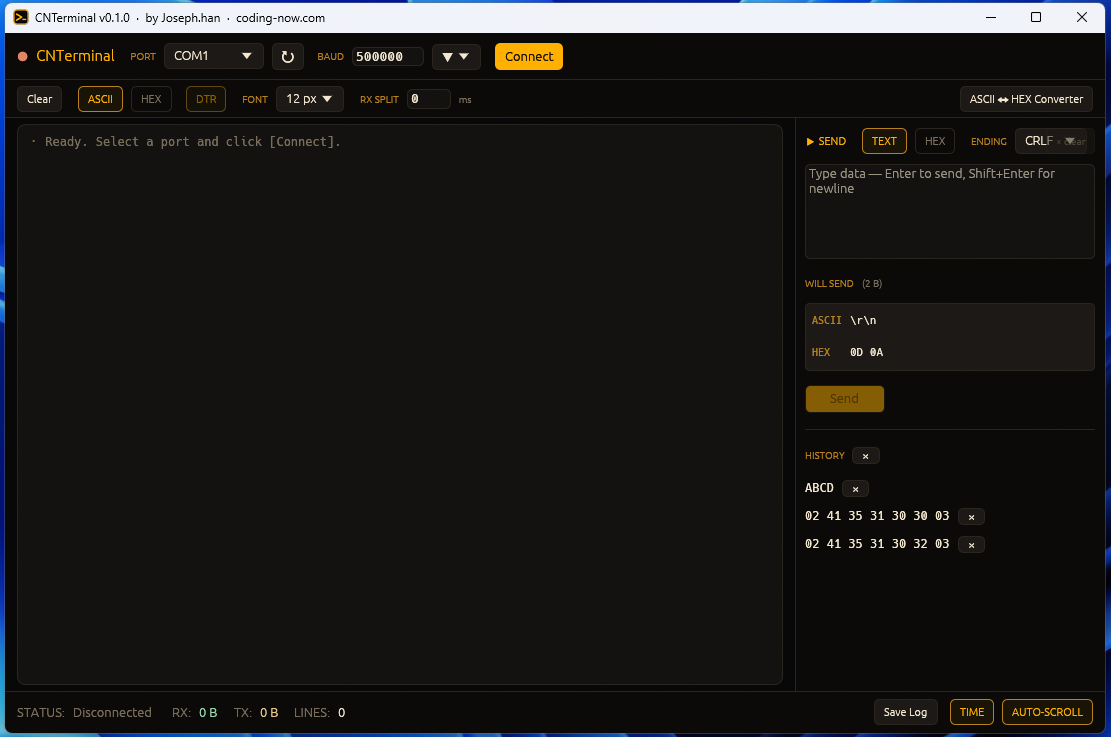
Its DTR toggle lets you open the port without resetting the ESP32. A single 8 MB executable, no install.
- ✓ Free
- ✓ Free Windows program (download and run)
- ✓ Open source
Why opening the port resets the board
ESP32 dev boards (DevKitC and friends) carry a USB-to-serial chip such as a CP2102 or CH340. Its DTR and RTS pins drive EN (reset) and IO0 (boot mode) through two transistors. Upload tools use those lines to put the chip into download mode and reset it automatically, which is why you rarely need to press the buttons.
The catch is that upload tools are not the only software touching those lines. Most terminal programs and drivers raise or drop DTR/RTS when they open a port. The circuit cannot tell an upload from a monitor, so it resets the chip either way.
The circuit only reacts when the two lines differ. For the auto-bootloader circuit most boards use, the states work out like this:
| DTR | RTS | EN | IO0 | Result |
|---|---|---|---|---|
| 1 | 1 | 1 | 1 | Normal run |
| 0 | 0 | 1 | 1 | Normal run |
| 1 | 0 | 0 | 1 | Held in reset |
| 0 | 1 | 1 | 0 | Boot-mode select (IO0 low) |
If the two lines don't change at exactly the same instant when the port opens, the brief mismatch is enough to reset the chip. That is why the fix is to not touch either line at all. Board vendors vary the circuit slightly, so details can differ.
Fixes by tool
PlatformIO
Two lines in platformio.ini stop the monitor from driving the lines. Uploads are unaffected — the uploader controls them separately.
[env:esp32dev]
platform = espressif32
board = esp32dev
framework = arduino
monitor_speed = 115200
monitor_dtr = 0
monitor_rts = 0Leave these two lines out on boards with no bridge chip (the built-in USB of an ESP32-S3 or C3). There, driving both lines low is itself a reset trigger, so monitor_dtr = 0 and monitor_rts = 0 make it reset every time. Not setting them at all is the fix.
ESP-IDF
idf.py monitor deliberately resets the board on start so you see the boot log. To attach to a board that is already running without resetting it, recent versions accept --no-reset.
idf.py -p COM5 monitor --no-resetPython pyserial
Turning the lines off after opening is too late. Create the port object first, set the line states, then call open().
import serial

ser = serial.Serial()        # not opened yet
ser.port = "COM5"
ser.baudrate = 115200
ser.dtr = False              # decide before opening
ser.rts = False
ser.open()

while True:
    line = ser.readline()
    if line:
        print(line.decode(errors="replace"), end="")
Arduino IDE
The Arduino IDE serial monitor generally has no option to leave these lines alone. If you need to watch without a reset, PlatformIO or a terminal with a DTR control is the quicker route.
A dedicated serial terminal
Any terminal that can open the port with DTR off solves it. In CNTerminal, open the port with the DTR toggle off and the ESP32 keeps running, so you pick up the log where it is.
Stuck on 'waiting for download'
Sometimes opening the monitor shows only this, and your program never starts:
rst:0x1 (POWERON_RESET),boot:0x3 (DOWNLOAD_BOOT(UART0/UART1/SDIO_REI_REO_V2))
waiting for download
DOWNLOAD_BOOT means IO0 was low at the moment of reset. The chip skips your firmware and waits for a new one — the fourth row of the table above (DTR 0, RTS 1).
- 1Close the monitor and press the board's EN (RST) button once. With the lines released, it boots normally.
- 2Reopen the monitor with RTS off using the settings above.
- 3If you wired buttons or sensors to GPIO0, check that nothing holds it low during boot.
Sometimes you want the reset
If you are after the messages printed right at boot — crash reasons, init logs — the auto-reset is a feature. Keep the defaults, or open the monitor with the lines off and press EN yourself. Switch it per situation.
Cutting the board's auto-reset traces, or using a USB-serial adapter wired for TX, RX and GND only, removes monitor resets entirely. The price is that every upload needs BOOT held while you tap EN to enter download mode by hand.
FAQ
Q. My Arduino Uno also resets when I open the monitor — same thing?
Similar. On the Uno, DTR reaches the reset pin through a capacitor, so opening the port resets the board once — by design, for uploads. A capacitor of around 10 µF between RESET and GND prevents it, but it must be removed before uploading.
Q. Won't turning DTR/RTS off break uploading?
No. You are only changing monitor settings. PlatformIO's monitor_dtr and monitor_rts apply to the monitor; the uploader drives the lines itself.
Q. Uploads fail with 'Wrong boot mode detected'.
The auto-reset did not get the chip into download mode. Charge-only USB cables, flaky hubs and a faulty auto-reset circuit are the usual causes. Hold BOOT as the upload starts and release it once 'Connecting...' appears.
Q. Does this apply to ESP32-S3 or C3 boards with native USB?
Same symptom, but the fix is reversed. On a board with no bridge chip, driving both lines low is itself one of the combinations that resets the chip, so monitor_dtr = 0 and monitor_rts = 0 make it reset every time. Leaving those two lines out, so the monitor never touches DTR/RTS, is what keeps the board up. An ESP32-S3 owner measured all three combinations and reported it (September 2026, r/esp32). To confirm the monitor is the culprit, check the reset reason in the boot log: since ESP-IDF 5.1.4 a USB-triggered reset is reported as ESP_RST_USB. The upload side is unchanged: that reset is a core reset that doesn't re-sample the strapping pins, so if the board stays in download mode after flashing, press EN once or use esptool's --after watchdog-reset.
Its DTR toggle lets you open the port without resetting the ESP32. A single 8 MB executable, no install.
- ✓ Free
- ✓ Free Windows program (download and run)
- ✓ Open source
Comments 0
No comments yet. Be the first.
Only members can comment.
Comments with ads, abuse, personal information or illegal content are hidden or removed. Members who post ads, spam, or hateful content are removed from the site, and everything they wrote is deleted. Comments are shown with your nickname. Privacy Policy