Extract Text from a PDF — Tables into Excel, Why Scans Give 0 Characters (6 PDFs Tested)
Sometimes you only want the words from a PDF — minutes, a notice, a form — to paste into a document or a spreadsheet. Some PDFs give the text right back; others give nothing at all. I made six PDFs (saved from Word, Hangul 2024 and Edge, a scan, a mix of the two, and a password-protected one), extracted the text in the browser, opened the same files in Word, and pasted the extracted tables into Excel.
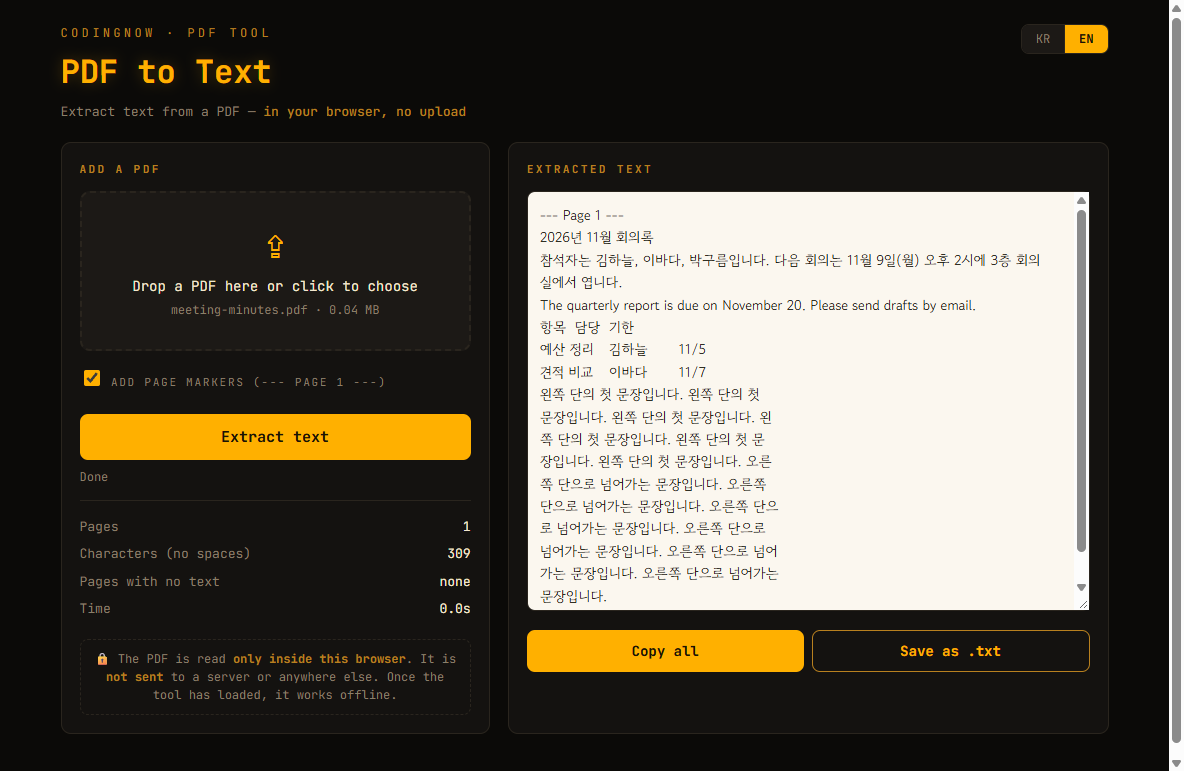
Drop in a PDF and get each page's text to copy or save as .txt. Table cells come out tab-separated so they split into Excel columns, and scanned pages with no text are flagged. Nothing is uploaded.
- ✓ Free
- ✓ No install, no sign-up
- ✓ Runs in your browser
- ✓ Files are never uploaded
🔒 Your file is never sent to a server or anywhere else — it is processed only in your own browser.
PDFs that give text, PDFs that don't
Besides what you see on screen, a PDF can carry a 'text layer'. Saving to PDF from Word, Hangul or a browser creates one; a PDF made by a scanner or from phone photos is just one picture per page. Text extractors read that layer, so a picture-only page has nothing to give.
| Test PDF | Pages | Text extracted | File size |
|---|---|---|---|
| Meeting minutes saved from Word (text, table, 2 columns) | 1 | 309 chars | 41 KB |
| Hangul 2024 document (body + 60-row table) | 2 | 1,603 chars | 26 KB |
| Web page saved from Edge | 1 | 59 chars | 27 KB |
| Scan (the same minutes as an image) | 1 | 0 chars | 11.6 MB |
| Text page + scanned page | 2 | 309 chars (page 2: 0) | 11.6 MB |
| Password-protected PDF | 1 | 309 chars (after the password) | 56 KB |
For the PDFs with text, the character counts matched what another PDF library (PyMuPDF) counted. The scan was the same page of minutes in a file 281 times larger — with no text at all.
Way 1 — extract in the browser (no upload)
- 1Open the PDF Text Extractor.
- 2Drag the PDF in or click to choose it. If it's password-protected, a password box appears.
- 3Copy all of the text or save it as .txt.
You can choose whether to add a '--- Page 1 ---' line before each page, and pages with no text are listed separately. In the mixed PDF, only page 2 was flagged as having no text layer. With the password PDF, a wrong password gave 'incorrect', and the right one gave the 309 characters.
While a PDF was dropped in and extracted, the browser's network log showed 0 new requests (2026-11-02). Keep F12 → Network open while you extract and you can check it yourself.
A PDF has no notion of paragraphs, only the lines you see, so text comes out broken wherever the page broke the line. Korean wraps by character, so the test minutes split one word across two lines ('회의' / '실에서'). Two-column pages came out left column first, then right.
Getting a table into Excel
On each line, the tool treats a gap wider than 1.5× the font height as a table cell boundary and puts a tab there. The 3-row table in the Word PDF and the 62-row table in the Hangul PDF both came out tab-separated, and no tabs appeared inside ordinary sentences.
| Text pasted into Excel | Result |
|---|---|
| Table with tabs between cells | Split into A, B, C; '11/5' became a date (2026-11-05) |
| Same table with spaces between cells | Whole row in column A |
| Tab table, after formatting column C as Text | Three columns, and '11/5' stayed as text |
- 1In Excel, click the header of the column that will hold date-like values (e.g. C).
- 2Right-click → Format Cells → Text.
- 3Click A1 and paste the extracted table.
Microsoft's help likewise says to format cells as Text before entering numbers you don't want turned into dates. In this test it worked for pasting too.
Way 2 — open the PDF in Word
Word opens a PDF by converting it into an editable Word document. According to Microsoft's help, the converted document may not match the original page for page, and the original PDF is left unchanged. I opened four of the test PDFs in Word.
| PDF opened in Word | Result | Time |
|---|---|---|
| Minutes saved from Word | 309 chars, 3×3 table intact | 15.8 s (includes Word's first start) |
| Hangul 2024 document | 1,598 chars; the 60-row table split into 2 tables; 2 pages became 3 | 1.0 s |
| Web page saved from Edge | 59 chars | 0.6 s |
| Scan | 305 chars by OCR; '3층' → '3증'; 2 table header cells lost | 1.1 s |
Word joined the page's lines back into paragraphs, but where a word had been split across lines ('회의실에서'), it rejoined it with a space ('회의 실에서'). Tables came in as real Word tables you can edit cell by cell.
Text from a scan is Word's best guess from a picture. Even in this small test one character next to a number changed and table cells went missing, so check it against the original line by line.
If it's a scan
- Open it in Word: it recognises the text, as tested above. Expect errors and proofread.
- Snipping Tool's Text actions: according to Microsoft's help, Windows 11's Snipping Tool can copy text from a capture with Text actions (not tested on this PC).
- Mixed PDFs: extract the text pages in the browser and open only the pages flagged as having no text layer in Word — fewer OCR guesses to proofread.
FAQ
Q. Is my PDF uploaded to a server?
The browser tool reads the PDF only inside your browser. The network log showed 0 new requests during extraction (2026-11-02).
Q. How can I tell if a PDF is a scan?
The tool shows a character count per page and flags any page with 0 as having no text layer. File size is a hint too: the same minutes were 41 KB as a Word PDF and 11.6 MB as a scan.
Q. Does it work with password-protected PDFs?
If you know the open password. Enter the right one and it extracts; a wrong one shows 'incorrect'.
Q. Excel turned my numbers into dates.
Format that column as Text (Format Cells → Text) and paste again. In the test, '11/5' became a date, and stayed '11/5' in a Text-formatted column.
Drop in a PDF and get each page's text to copy or save as .txt. Table cells come out tab-separated so they split into Excel columns, and scanned pages with no text are flagged. Nothing is uploaded.
- ✓ Free
- ✓ No install, no sign-up
- ✓ Runs in your browser
- ✓ Files are never uploaded
🔒 Your file is never sent to a server or anywhere else — it is processed only in your own browser.
Comments 0
No comments yet. Be the first.
Only members can comment.
Comments with ads, abuse, personal information or illegal content are hidden or removed. Members who post ads, spam, or hateful content are removed from the site, and everything they wrote is deleted. Comments are shown with your nickname. Privacy Policy