One right-click,
your favorite app launches
Adds your favorite programs as a cascading submenu to the Windows desktop / folder right-click menu. 3.4 MB single .exe, no admin rights, HKEY_CURRENT_USER only. Cleaner than pinning everything to the taskbar, one click faster than Start menu search.
Windows 10 / 11 (64-bit) · No runtime prerequisites · Single .exe · Drop in any folder and run. All releases
▶ Live Demo — context menu in action
An interactive in-browser recreation of the real flow: right-click → Favorite Tools → launch loops every 12 seconds, and the manager UI shows colored buttons, changed-row highlighting, and dead-path warnings on the same page.
The actual app
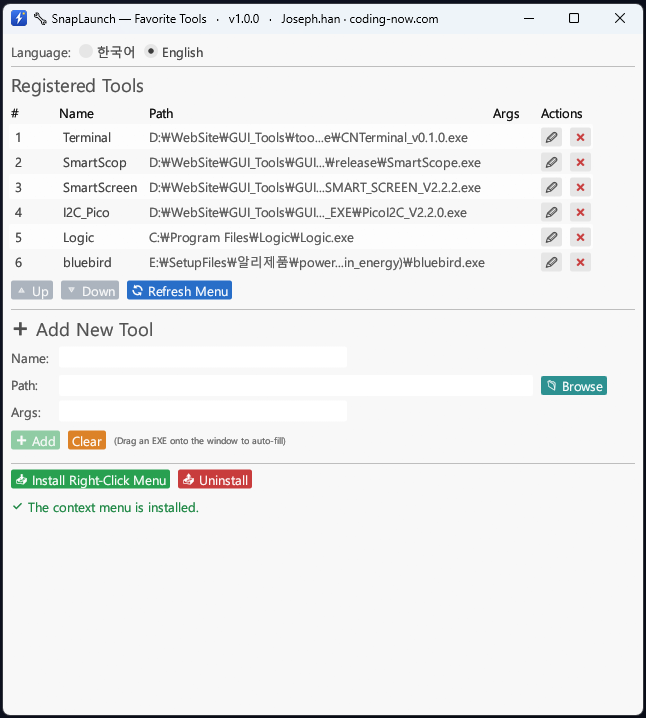
Register your favorite .exe files and hit 📥 Install context menu once. Color-coded buttons (green/red/blue/slate/teal/amber) tell purpose at a glance, edited rows highlight in light blue, dead paths flash a red ⚠.
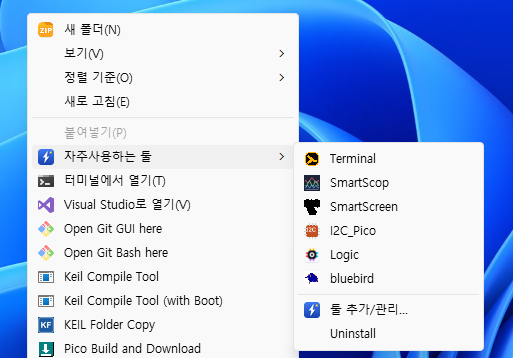
Right-click any empty space on the desktop or inside a folder → Favorite Tools → your apps appear as a cascading submenu. No more digging through Start menu.
Why this exists — taskbar & Start menu fall short
Pinning everything to the taskbar fills it up fast, and Start menu search adds a keyboard hop. What we wanted was a mouse-only instant launcher — and Windows already has the right surface (the context menu), but adding entries to it manually means registry hacking and admin rights.
SnapLaunch makes it one screen, one click. HKCU-only means no admin and no impact on other users. Single .exe so you can carry it on a USB stick. Even if you delete the .exe, an auto-generated rescue .bat cleans up the menu.
Who it's for
- Developers — VS Code, Cursor, terminal, git clients, DB clients one right-click away
- Designers / video editors — heavyweight apps (Photoshop, Premiere, DaVinci) skip the Start menu wait
- Corporate PC users — build a personal favorites menu without IT approval (HKCU only)
- Multi-PC users — keep .exe + JSON on a USB stick, get the same favorites anywhere
- Mouse-first workers — for whom keyboard shortcuts feel awkward and Start menu search is friction
Download & first install
Grab snap-launch.exe from the button above or GitHub Releases. About 3.4 MB.
- Drop
snap-launch.exeinto any folder (e.g.C:\Tools\SnapLaunch\) - Double-click to open the manager window
- Add your favorite programs → click 📥 Install context menu
- Right-click any empty space on the desktop or in a folder
Windows SmartScreen may say “Windows protected your PC”. Expected for an unsigned free Rust build — click More info → Run anyway to proceed.
SHA-256 integrity: 97cb605f417cc709b5a3f4c3909126bb7980addb1c3f99b07e116c355b57a204
PowerShell: Get-FileHash snap-launch.exe
Basic workflow
Step 1 — Register a tool
Hit 📁 Browseto pick an .exe (drag & drop also works). PATH-resolvable commands like calc.exe or notepad work without an absolute path. Optional CLI args supported (e.g. VS Code opening a specific folder on launch).
Step 2 — Install the menu
📥 Install context menu registers cascading submenus on both the desktop and folder-background right-clicks ( HKCU only).
Step 3 — Reorder & refresh
Move rows up/down — they highlight in light blue + ● (pending). Click 🔄 Refresh menu to apply → context menu updates instantly.
Step 4 — Uninstall (3 ways)
- Click Uninstall in the context menu itself (easiest)
- Use the 📤 Uninstall button in the manager
- CLI:
snap-launch.exe uninstall
💡 Emergency recovery: install creates SnapLaunch_복구.bat next to the .exe. If snap-launch.exe is deleted, double-click that .bat to clean up the registry menu.
Use cases
Developer workstation
VS Code, Cursor, WSL terminal, GitHub Desktop, DBeaver, Postman in one menu. Create a new project folder, right-click inside it → VS Code → folder opens. Skip the Start menu entirely.
Design / video editing
Photoshop, Illustrator, Premiere, DaVinci Resolve, Audacity in one right-click. Heavy apps that normally make you wait through Start menu searches now open instantly.
Office daily-driver
Excel + your company ERP + groupware + screenshot tool + PDF viewer — your daily set in one right-click. Especially useful when you can't pollute the corporate taskbar.
USB workspace
Pack snap-launch.exe + snap-launch-tools.json + your portable apps on a USB stick. Plug into any PC, one "install" click, same favorites menu. Great for on-site work, travel, or moving machines.
Under the hood — HKCU registry + cascading submenus
The context menu is registered at two registry locations as cascading submenus:
HKCU\Software\Classes\DesktopBackground\Shell\SnapLaunch
  ; desktop right-click
HKCU\Software\Classes\Directory\Background\Shell\SnapLaunch
  ; folder-background right-click

  └─ shell\aaa_NNN_<id>     each tool entry
  └─ shell\zzz_manage       "Add / manage tools..." (auto separator ↑)
  └─ shell\zzz_uninstall    "Uninstall"
Each tool runs as snap-launch.exe launch <id> which calls Command::spawn() and exits immediately (no background process). The GUI is Rust + egui (eframe), statically linked, so no VC++ runtime needed. Full source on GitHub under MIT.
Key features
| Feature | Notes |
|---|---|
| HKCU-only | No admin rights, no impact on other users |
| Single .exe | Rust static link, 3.4 MB. No VC++ runtime, .NET, or WebView2 required |
| Korean / English UI | Radio toggle in the GUI — both manager and context menu switch together |
| Edited-row highlight | Added / edited / reordered rows show light blue + ●; clears on menu refresh |
| Dead-path detection | Missing .exe shows red ⚠ + confirms removal when invoked |
| Portable config | snap-launch-tools.json next to the .exe → travels with USB |
| Rescue batch | Auto-generated SnapLaunch_복구.bat cleans up the menu even if the .exe is deleted |
FAQ
Q. Do I need admin rights?
Not at all. Everything is registered under HKEY_CURRENT_USER only. Works on locked-down corporate or school PCs where you have no admin.
Q. SmartScreen / antivirus blocks it.
Expected for an unsigned free Rust build. Click More info → Run anyway, or build from source with cargo build --release.
Q. I accidentally deleted snap-launch.exe.
On install, SnapLaunch creates SnapLaunch_복구.bat next to the .exe. Double-click that .bat to clean up the registry menu. If both are gone, drop snap-launch.exe back into the same folder and run snap-launch.exe uninstall.
Q. Can I run it from a USB stick?
Yes. All settings live in snap-launch-tools.json next to the .exe. The same favorites travel with the stick. Note: registry menu entries are per-PC — you'll need to click "install" once on each PC.
Q. What happens if a registered program disappears?
The manager shows dead paths with a red ⚠. Clicking the item from the context menu asks “Remove this item?” — confirm to drop it from the list automatically.
Q. Are there macOS / Linux builds?
Windows-onlyby design — the core feature is Windows context-menu registry integration, which doesn't port. For similar workflows: macOS Quick Actions, or desktop-environment-specific shortcut tools on Linux.
📌 Free · Open source · No ads
Built to keep the desktop clean while making frequent apps one click away. Whether on a corporate or personal PC, no admin needed — your workflow gets one step faster.
Source & issues: github.com/cflab2017/Tool_SnapLaunch
Found this useful? ❤️ Support the maker
Any amount helps. Sent directly with no ad or processing fees.
Comments 0
No comments yet. Be the first.
Only members can comment.
Comments with ads, abuse, personal information or illegal content are hidden or removed. Comments are shown with your nickname. Privacy Policy