A free audio cutter,
entirely in your browser
Cut the exact region you want and save it as lossless WAV. 100% client-side — your files are never uploaded. Drag handles on the waveform, preview the selection, then download — no install, no signup.
Runs in your browser · Input MP3/WAV/M4A/OGG/FLAC · Output WAV (16-bit PCM) · No install.
▶ Demo — load · select · cut
The walkthrough below replays the real flow: load audio → drag a region on the waveform → preview → cut & download, automatically.
Actual screen
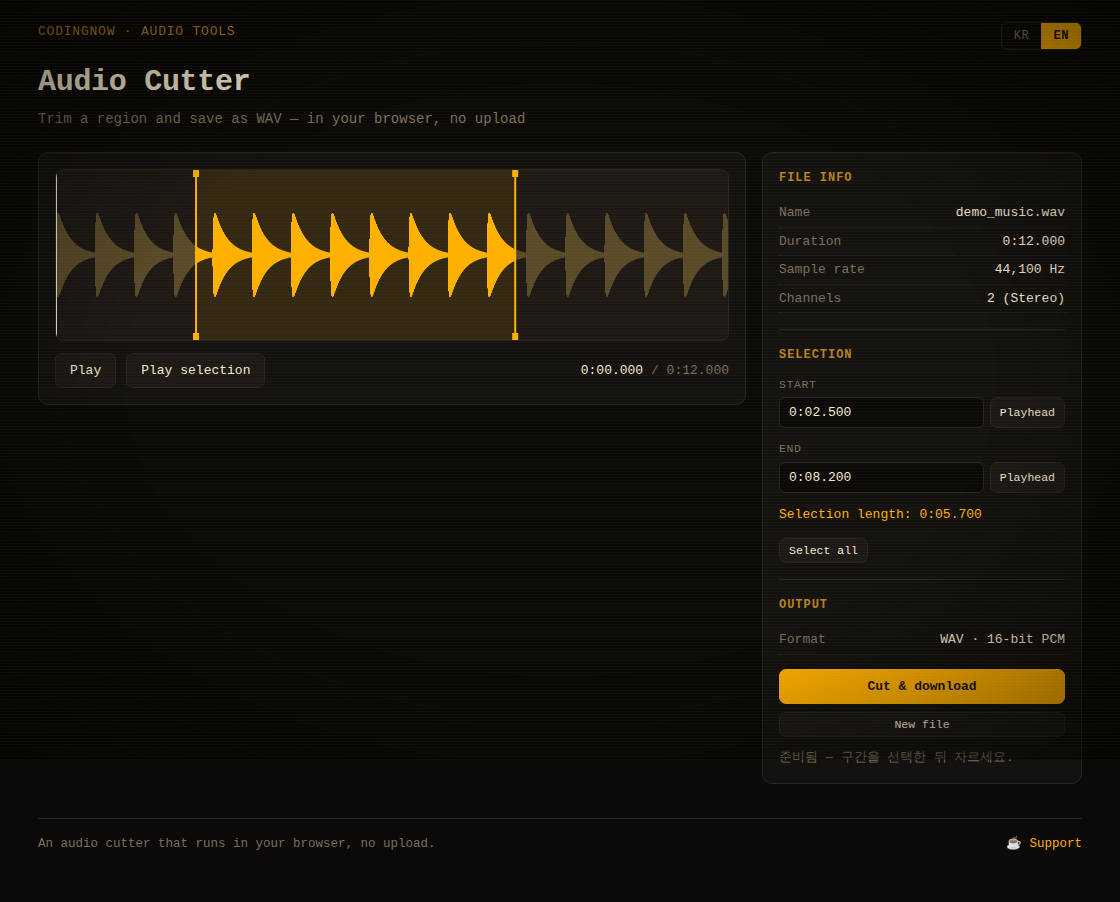
The waveform and playback controls sit on the left; file info (name, duration, sample rate, channels), the selection (start, end, length) and output info on the right. Drag the handles or type exact times to set the region.
Why I built it — no upload, no bloat
To grab just one phrase of a song, one part of a lecture, or one segment of a recording without wondering "where do I upload this?" Typical online editors send your file to a server; this tool keeps decoding, cutting and saving entirely in the browser — recordings and sensitive audio never leave your machine.
It is a single HTML file that uses no external libraries, so there is no install, signup or payment, and it works offline.
Who it's for
- Content creators — quickly extract the segment you need for a video or podcast
- Ringtones & alarms — cut one phrase from a favorite track
- Lecture & recording cleanup — keep only the key part of a long recording
- Privacy-conscious users — when you want local-only processing with no upload
How to use
Step 1 — Load a file
Drag an audio file onto the dashed area, or click to pick one. MP3 · WAV · M4A · OGG · FLAC and anything else your browser can decode are supported. Once loaded, the waveform plus file name, duration, sample rate and channels appear.
Step 2 — Select a region
- Drag the handles — pull the vertical handles on each side of the waveform to set start/end
- Draw a new region — press and drag on an empty part of the waveform to define a new selection
- Type exact times in the start/end fields (e.g.
1:23.500or83.5)
Step 3 — Preview
Use Play selection to hear just the chosen region before cutting. Click the waveform to move the playhead, and use the To playhead buttons to set the current position as start or end — great for cutting precisely while you listen.
Step 4 — Cut & save
Press Cut & download and the selection is saved as name_cut.wav. The output is a lossless 16-bit PCM WAV that keeps the original sample rate and channels.
💡 WAV is uncompressed, so the result can be larger than the source MP3. If you need MP3 back, convert the saved WAV with a separate converter.
📖 Lossless MP3 cuts, the WAV→MP3 command, and ringtone setup: How to Trim an MP3: 3 Free Ways · How to make a ringtone from an MP3 · Convert WAV to MP3 · Trim a voice recording (iPhone, Android, Windows) · Record audio on Windows 11 (mic or PC sound) · Convert MP4 to MP3 on Windows
Key features
| Feature | Detail |
|---|---|
| Real cut | Re-encodes the selection to 16-bit PCM WAV (not fake) |
| Waveform editing | Handle drag · region drawing · exact time input |
| Region preview | Play just the selection before cutting |
| Input formats | MP3 · WAV · M4A · OGG · FLAC (any browser-decodable format) |
| KR / EN toggle | Switch instantly without reloading |
| 100% in-browser | No upload, no external libraries, works offline |
FAQ
Q. Are my audio files uploaded to a server?
No. Decoding, cutting and saving all happen inside your browser. It works offline, and your files are never sent over the network.
Q. Why WAV instead of MP3?
Browsers ship no built-in MP3 encoder, and this tool uses no external libraries. So it exports lossless WAV with zero dependencies. If you need MP3, convert the saved WAV afterward.
Q. Which formats can I load?
Anything your browser can decode (typically MP3 · WAV · M4A · OGG · FLAC). If decoding fails, an on-screen message explains it.
Q. Can it fade or adjust volume?
This version focuses on cutting only — doing the one core action flawlessly.
Q. Can I cut multiple regions at once?
One region at a time for now. You can export several times, changing the selection between exports.
✂️ Free · Open source · No ads
"Load audio, cut out the region you want, download it." Doing that one thing as fast and safely as possible is the goal. Try it now — with zero upload worries.
Source & issues: github.com/cflab2017/Tool_web_mp3_cutter
Found this useful? ❤️ Support the maker
Any amount helps. Sent directly with no ad or processing fees.
Comments 0
No comments yet. Be the first.
Only members can comment.
Comments with ads, abuse, personal information or illegal content are hidden or removed. Comments are shown with your nickname. Privacy Policy